
Phoning my agents: a self-hosted speech engine for BattleLab calls
BattleLab takes phone calls now. I tap Call and I am talking to HQ, the part of BattleLab that keeps track of all my agent sessions. I ask what finished today, tell it to hold a pull request, or have it start on a bug. It answers out loud. When it goes on too long I talk over it, and it stops and listens.
All of the speech runs on our own GPU workstation. Nothing goes to a cloud speech service. This post is about that part: the two servers that turn my voice into text and HQ's answers back into a voice, why the first version stuttered, and how to run the same thing yourself. The code is on GitHub as voicewire, MIT licensed.
What a phone call needs
A chat window forgives a lot. You send a message, you look away, the answer is there when you look back. A call does not work like that. If nothing comes back for three seconds, it sounds like the line dropped, and you start talking again just as the answer arrives. So the targets were:
- First audio in under half a second after HQ has its answer.
- Speech generated faster than it plays, with room to spare. If the model needs 1.2 seconds for every second of speech, the reply stutters, whatever the network does.
- No gaps in the middle of a sentence.
- The right language on a one-second clip. I switch between English and German, and "Nein, abbrechen" must not come back as English.
The measure for the second point is the real-time factor (RTF): seconds of GPU time per second of speech. Below 1.0 the audio is made faster than it plays.
The path of one sentence
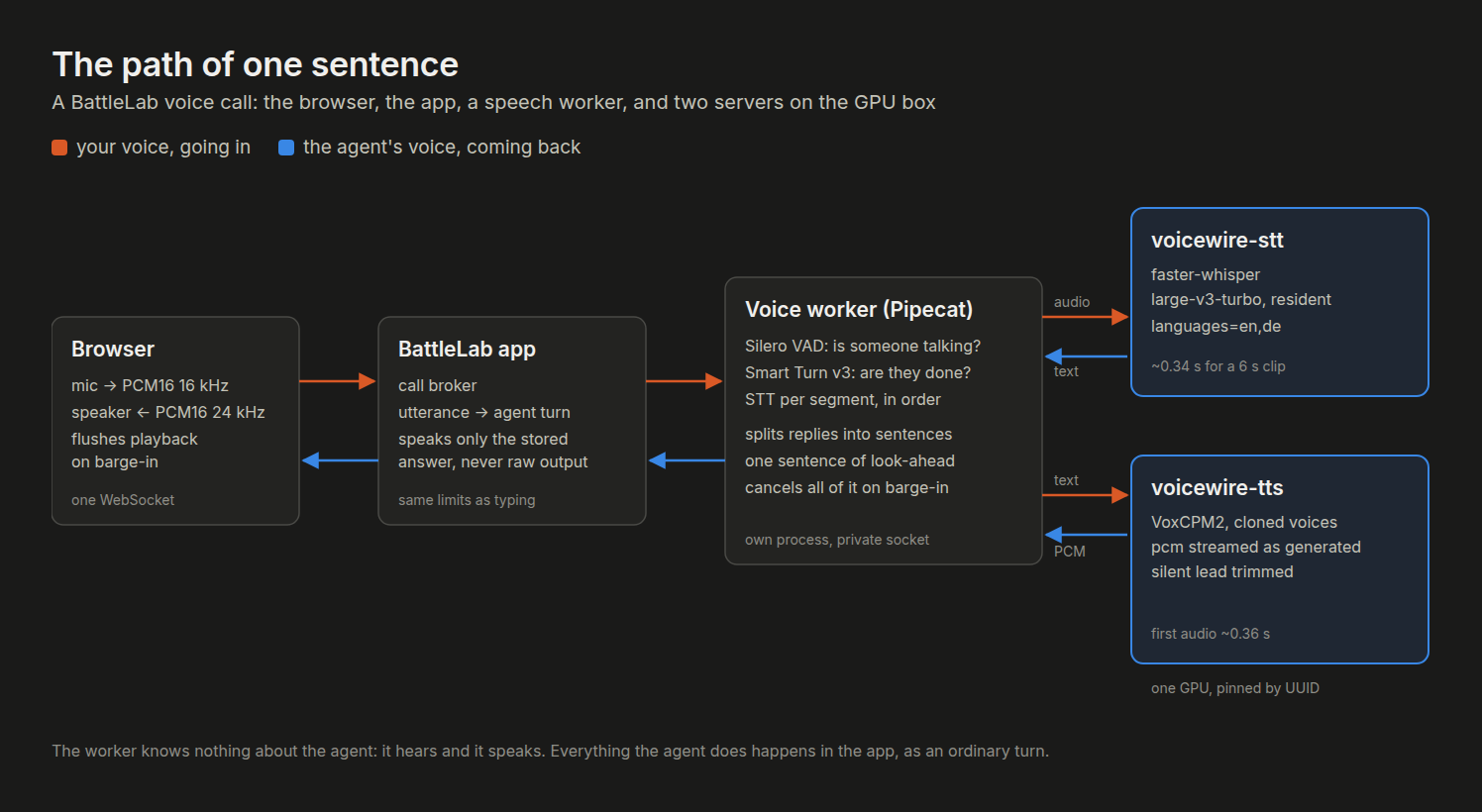
The browser sends the microphone as 16 kHz PCM over one WebSocket. A voice worker, a separate process built on Pipecat, listens to it. Silero VAD decides when someone is talking, and Smart Turn v3 decides when they are done, which is not the same as a pause. Each spoken segment goes to the speech-to-text server. The app turns the text into an ordinary HQ turn, with the same tools and limits as typing. The answer is split into sentences, and each sentence goes to the text-to-speech server, which streams audio back as it makes it.
The worker knows nothing about HQ, and HQ never speaks anything it did not store as its answer. Raw tool output never reaches the voice.
Listening: faster-whisper
The speech-to-text server is faster-whisper with the large-v3-turbo model, behind the OpenAI transcription API. The model stays loaded. It runs one request at a time, off the event loop, behind a wait line of 32. When the line is full, the next request gets a 429 straight away instead of waiting for minutes. A 6-second clip takes about a third of a second.
Language was the surprise. Whisper guesses the language from the first seconds of audio, and on short clips that guess is close to random. In testing, room noise came back as Spanish, and a short German "Nein, abbrechen." came back as English, "Nine abrasion.", with 0.99 confidence. So the server takes two extra fields:
curl localhost:8771/v1/audio/transcriptions \
  -F file=@turn.wav -F response_format=verbose_json \
  -F languages=en,de -F language_hint=de
languages lists what can occur, and the choice is made among those only. language_hint is the language of the call so far. A clip shorter than 1.5 seconds keeps it, and a longer one switches only when another expected language gets 75% of the probability. Whisper also falls into loops on noise ("I'm going to show you how I'm going to show you how..."). Text that compresses that well is not speech, so those segments are dropped.
Talking: VoxCPM2, streamed
The voice is VoxCPM2. It is Apache-2.0 licensed, adds no watermark, speaks 30 languages, and can clone a voice from a short clip. I tried Chatterbox first. It embeds a watermark in every file and ran at an RTF of about 2.2, so it was too slow for a call.
The important part is response_format: pcm. With it, the server sends raw 16-bit audio while the model is still generating. One worker thread per request holds the model and pulls its audio chunks. The HTTP response sends no headers until the first chunk exists, so a failure before that is still a proper status code. A failure after it closes the connection, so the client never mistakes half a sentence for a whole one. If the caller hangs up, even while still waiting in line, the generation stops.
Two small details took off a lot of delay. When VoxCPM2 clones a voice, it starts with 0.3 to 1.0 seconds of silence. On a call you hear that as HQ hesitating before every sentence, so the server cuts it. And the stream is sent at 24 kHz instead of the model's 48 kHz. The browser plays at 24 kHz anyway, and half the bytes matters on a busy link.
Why the first version stuttered
The first calls were rough. Replies came late and broke up in the middle. There were four separate causes, and each needed its own fix.
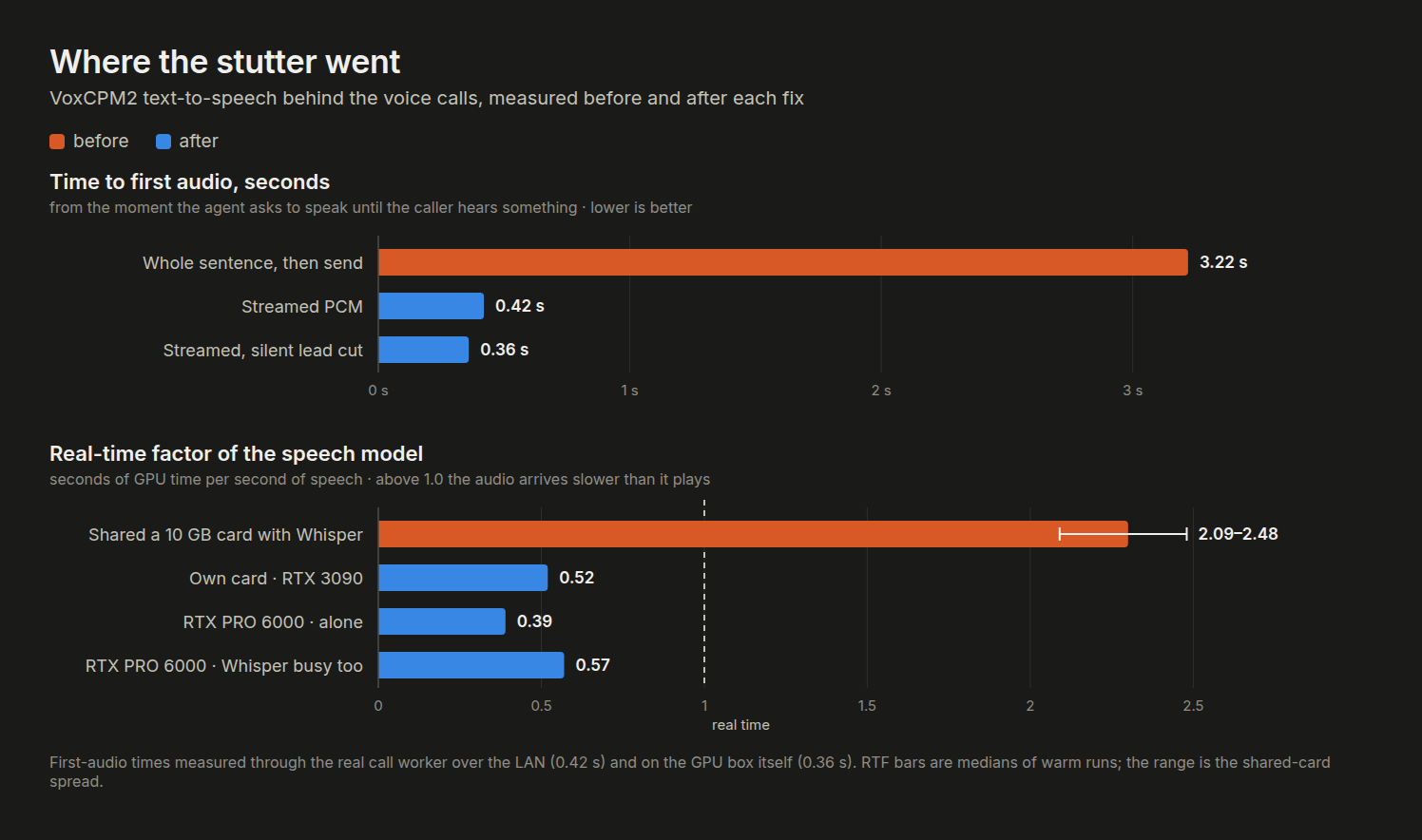
The voice model shared a card with Whisper. Both fit on a 10 GB card, but whenever Whisper ran, the speech model dropped from RTF 0.6 to between 2.1 and 2.5. That is more than twice as slow as real time, so the reply stuttered no matter what. Moving it to its own card brought it to 0.52. Each service is pinned to its card by UUID, not by index, because the indices moved the last time we added a card.
Each sentence was made in full before any of it was sent. Streaming took first audio from 3.22 seconds to 0.42.
The look-ahead got ahead of itself. To avoid a gap between sentences, the worker asks for the next sentence while the current one plays. At first it sent both requests at once. The server has one model and takes whichever request arrives first, and in 5 of 9 replies that was the second sentence. The caller then waited for sentence two before hearing sentence one: 2.17 seconds on average, against 0.27 when they ran in order. Now the next sentence waits until the current one has produced its first audio.
The GPU box drops packets on its uplink. That one is still open. The 24 kHz stream and a small playback buffer on the client cover most of it.
Since then both models moved onto one RTX PRO 6000 (96 GB, the 300 W Max-Q version). With that much room they no longer get in each other's way: first audio in 0.31 seconds with the card to itself and 0.36 with Whisper busy at the same time, and an RTF between 0.39 and 0.57.
Running it yourself
The two servers, the scripts around them and the tests are in voicewire. You need Linux (WSL2 works), an NVIDIA card with 12 GB or more, Python 3.10 to 3.12 and about 15 GB of disk. Both models together use about 9 GB of VRAM.
git clone https://github.com/teriansilva/voicewire
cd voicewire
scripts/setup.sh                # two venvs, ~15 min
nvidia-smi -L                   # copy your card's UUID
$EDITOR ~/.config/voicewire.env # set it for STT and TTS
systemctl --user enable --now voicewire-stt voicewire-tts
loginctl enable-linger "$USER"  # start at boot
setup.sh makes one environment per service, because faster-whisper and VoxCPM2 want different packages. It also replaces the torch that VoxCPM2 installs with a CUDA 12.8 build, since the default one has no kernels for Blackwell cards. serve.sh refuses to start if the card in the config is not there. It never falls back to "all GPUs", because that is how a voice model ends up next to an image model.
When /v1/health says "loaded": true, check the pair:
python3 scripts/check.py --voice harbor --runs 6It tests what a call needs, measured the way the caller hears it. For the stream it reports how long a player that starts at the first chunk would sit waiting for the next one. It reads the TTS audio back through Whisper to check the words. This is the output from an RTX 3090 with both models on it:
(check.py output goes here)It works against any OpenAI-compatible pair, so you can point it at a hosted service and compare. To just hear something:
python3 scripts/say.py "Hello from the GPU." --voice lumenTo ship a change, scripts/deploy.sh tts keeps the live directory as a dated copy, copies the new files, compares every checksum, restarts the service and waits for the health check. If the service does not come back, it prints the exact --restore command. It never deletes anything.
Voices
A named voice is a short clip that the server clones on every request. The clip is the voice, so a bad clip is a bad voice, and no request parameter can fix it. I learned that the hard way. Two of my first voices sounded fine as clips but cloned into something that sounded like a child.
Two facts made it worse. The pitch of a clip does not predict the pitch it clones to, so checking the clip tells you nothing. And cloned pitch changes from one render to the next. The first measurement of one bad voice was a healthy-looking 89 Hz, and the next two were 145 and 481.
So design_voice.py checks the output instead. It makes candidates from a written description, checks with Whisper that each one says exactly its sentence, then clones a test sentence from it five times and measures the pitch of each render. A candidate passes only if the median is in the range you give and the spread stays small.
python scripts/design_voice.py lumen --band 165,240 \
  --describe "A woman in her thirties, bright and \
friendly mezzo voice, clear diction"
Requests can also steer delivery: a style preset (calm, warm, serious, dramatic and a few more) or free text in instructions, such as "whispering, a bit amused". The server sends it to VoxCPM2 as the style prefix the model understands. OpenAI's speed becomes a pace hint. An unknown voice name gets a 400. It never falls back silently, because a typo should not quietly change who is talking.
What is not solved
- A TTS restart reloads the model, which takes about a minute. Restart between calls, not during one.
- Romanian comes out garbled in VoxCPM2, so it is not offered. English, German and 28 other languages work.
- The servers have no authentication. They listen on
127.0.0.1by default. Put a proxy with authentication in front before you open them to a network. - The packet loss on the GPU box's uplink is still there.
The voice calls are part of BattleLab. The speech servers are not tied to it. They speak the OpenAI audio API, so Pipecat, LiveKit Agents, LiteLLM or a plain curl can use them as they are.
Cover art generated locally and animated with Wan 2.2 on our own GPU workstation. The voice samples come straight out of the servers described here.
// COMMS