
Guide: DeepSeek-V4.1-Flash on two GB10 boxes, plus a sparkDash dashboard
This guide runs DeepSeek-V4.1-Flash, a 552B-parameter model, across two NVIDIA GB10 desktop boxes (DGX Spark or ASUS Ascent GX10), then adds sparkDash as a live dashboard for both machines. Plan on about 2.5 hours, most of it downloading weights.
What you need
- Two GB10 boxes (128 GB unified memory each), running Ubuntu 24.04 with Docker and the NVIDIA container toolkit.
- A direct QSFP cable between the ConnectX-7 ports of the two boxes.
- About 400 GB free NVMe on each box. The weights are ~387 GB.
- The Hugging Face CLI on the head:
pip install -U 'huggingface_hub[hf_transfer]'.
One box is the head: it runs rank 0 and serves the API. The other is the worker (rank 1). You only ever run commands on the head; it starts the worker over SSH.
Part 1: DeepSeek-V4.1-Flash on two boxes
Step 1: Link the two boxes
Give the ConnectX-7 port on each side a static IP and jumbo frames. Use the port the cable is actually plugged into.
# head
sudo ip addr add 10.10.10.1/24 dev enp1s0f1np1 && sudo ip link set enp1s0f1np1 mtu 9000 up
# worker
sudo ip addr add 10.10.10.2/24 dev enp1s0f0np0 && sudo ip link set enp1s0f0np0 mtu 9000 up
Make the addresses permanent in netplan, then check that a full jumbo frame gets through:
ping -M do -s 8972 -c 3 10.10.10.2Step 2: Let the head reach the worker
ssh-copy-id you@10.10.10.2
ssh you@10.10.10.2 docker ps   # must work without a password
Step 3: Get the recipe
We use Mia's AI Lab's DeepSeek-v4.1-Flash-EXL3-2x-DGX-Sparks recipe. It serves a 2.9-bit EXL3 build of the model on vLLM with tensor parallelism across both boxes.
git clone https://github.com/MiaAI-Lab/DeepSeek-v4.1-Flash-EXL3-2x-DGX-Sparks ~/dsv41
cd ~/dsv41
cp .env.example .env
Edit only these lines in .env:
HEAD_IP=10.10.10.1
WORKER_IP=10.10.10.2
WORKER_USER=you
WEIGHT_SYNC=rsync
WEIGHT_SYNC=rsync gives the worker its own local copy of the weights. The default NFS sharing failed on our kernel, and a local copy is faster anyway if the worker has the disk space.
Step 4: Download the weights
./download.shThis fetches the 39 EXL3 shards (~197 GB) and the two Engram shards from the original checkpoint (~190 GB). It is resumable, so just re-run it if it stops. It took us about 95 minutes.
Check: the engram-src/ folder must contain config.json. If it is missing, the server dies at startup. Fetch it with:
hf download deepseek-ai/DeepSeek-V4.1-Flash config.json --local-dir engram-srcStep 5: Start the model
./start.shThe first run pulls the container image (~9 GB), copies it and the weights to the worker over the direct link (~13 minutes at ~500 MB/s), and boots both ranks. Loading takes 25–30 minutes. Watch it with:
./start.sh status
./start.sh logs          # head
./start.sh logs worker
Step 6: Test it
bash tests/test_smoke.sh     # asks 17*19, expects 323

curl http://localhost:8888/v1/chat/completions -H 'Content-Type: application/json' -d '{
  "model": "DeepSeek-v4.1-Flash-EXL3",
  "messages": [{"role": "user", "content": "Say hello in German."}],
  "max_tokens": 64,
  "chat_template_kwargs": {"enable_thinking": false}
}'
That is an OpenAI-compatible API on port 8888, ready to put behind a gateway such as LiteLLM. Thinking is on by default. For thinking replies, set max_tokens to 32k or more.
Step 7: Survive reboots
Wrap the start in a systemd unit on the head only; the worker needs no unit. Our unit runs SKIP_PULL=1 SKIP_DOWNLOAD=1 SKIP_SYNC=1 ./start.sh restart, and a small timer restarts it if /health fails three times in a row.
Three rules that keep it stable
- Don't run heavy jobs on either box. The model leaves only ~4–6 GB of unified memory free. No builds, no big copies without a memory cap.
- Don't raise
GPU_MEM_UTILabove the shipped 0.88. - Never
docker restartthe model containers. GPU access breaks inside a restarted container on GB10. Always go through./start.sh restartor your systemd unit.
Part 2: sparkDash, a live dashboard for both boxes
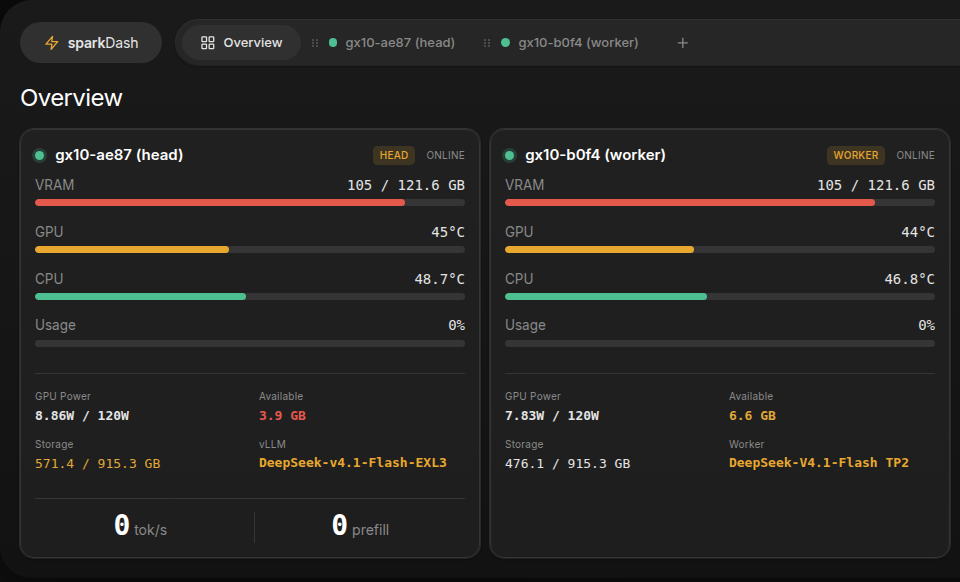
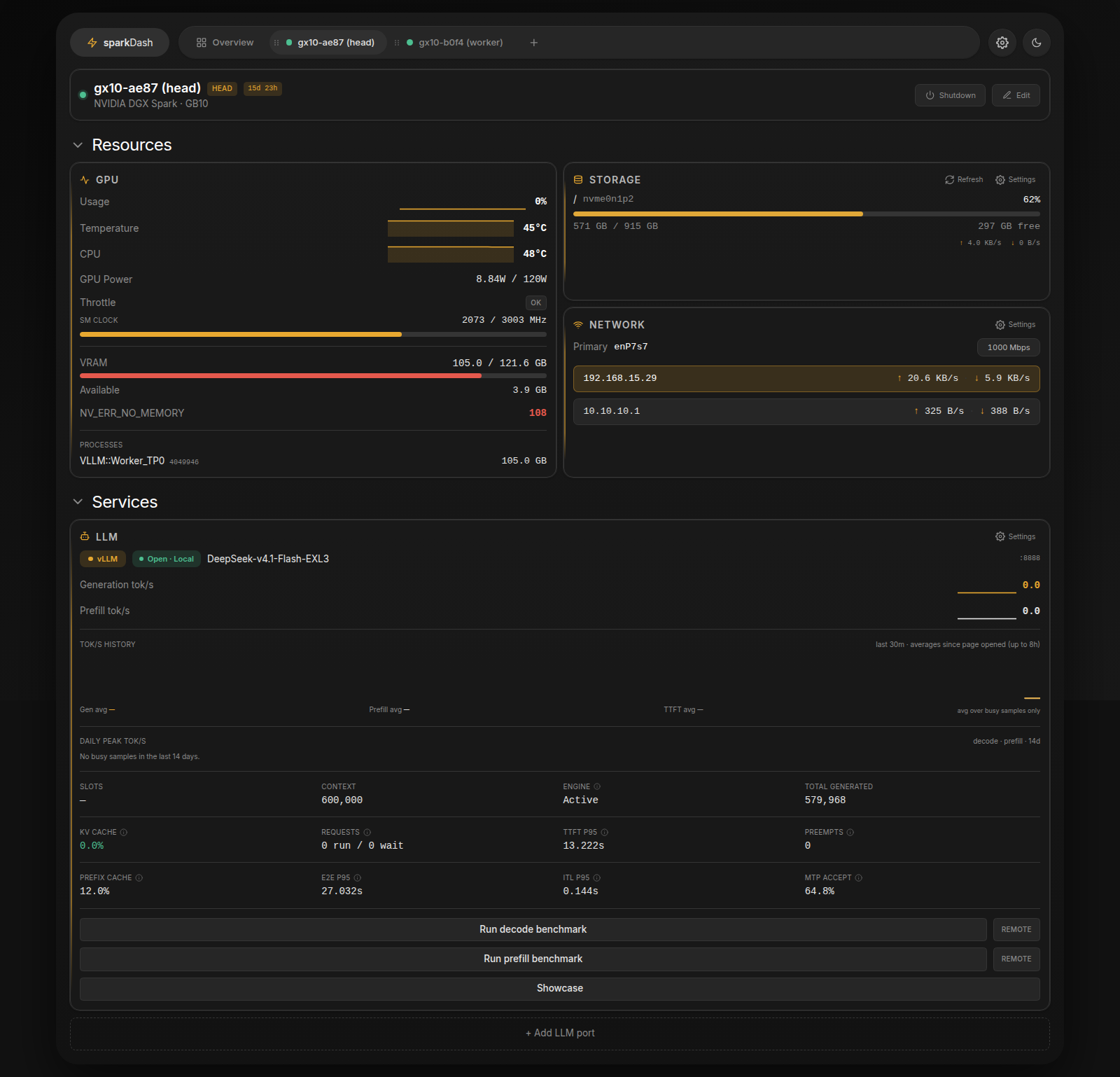
sparkDash (MIT) shows GPU, unified memory, disks and network for each box, and reads the model server's own metrics: tok/s, KV cache, latency and speculative-decoding acceptance. One install on the head covers both boxes.
Step 1: Build it on another machine
Don't build on the head: an npm build is exactly the kind of memory spike that gets the model killed. The frontend is plain JavaScript, so any machine can build it.
git clone https://github.com/MiaAI-Lab/sparkDash && cd sparkDash
npm ci && npm run build && npm prune --omit=dev
rsync -a --exclude .git --exclude /assets ./ you@head:sparkdash/app/
Watch the slash in --exclude /assets. Without it, rsync also skips dist/assets and the dashboard loads as a blank page.
Step 2: Install Node on the head
curl -fsSLO https://nodejs.org/dist/v22.23.2/node-v22.23.2-linux-arm64.tar.xz
mkdir -p ~/sparkdash/node && tar -xJf node-v22.23.2-linux-arm64.tar.xz -C ~/sparkdash/node --strip-components=1
Step 3: Run it as a small, unprivileged service
The upstream Docker setup runs privileged, with full access to the host. Running it as a normal service works just as well and keeps it contained. Create /etc/systemd/system/sparkdash.service:
[Service]
User=you
WorkingDirectory=/home/you/sparkdash/app
ExecStart=/home/you/sparkdash/node/bin/node server/index.js
Environment=NODE_ENV=production PORT=5555 BIND_HOST=127.0.0.1 LLM_PORT=8888
Environment=HOST_PROC_PATH=/proc HOST_SYS_PATH=/sys HOST_ROOT_PATH=/
MemoryMax=512M
Restart=always

[Install]
WantedBy=multi-user.target
sudo systemctl daemon-reload && sudo systemctl enable --now sparkdashIt uses about 130 MB. The 512 MB cap guarantees it can never compete with the model for memory.
Step 4: Open it and add both boxes
ssh -N -L 5555:127.0.0.1:5555 you@head # then browse http://127.0.0.1:5555Click + and add:
- The head: "local" ticked, role Head, LLM port 8888.
- The worker: its LAN IP, SSH user, key auth, role Worker, with the head as its head. sparkDash reads the worker over SSH, so nothing needs installing there.
Step 5 (optional): Open it from anywhere
sparkDash has no login of its own, and it has real shutdown buttons, so never expose the port directly. We publish it through our nginx load balancer with two gates:
- A normal login in nginx (
auth_basic). - sparkDash's built-in token. Set
SPARKDASH_TOKENandBIND_HOSTto the head's LAN IP, and let nginx add the token for you:
auth_basic           "sparkDash";
auth_basic_user_file /etc/nginx/htpasswd/sparkdash;

location /ws { proxy_pass http://HEAD_LAN_IP:5555; proxy_set_header Authorization "Bearer TOKEN";
               proxy_http_version 1.1; proxy_set_header Upgrade $http_upgrade; proxy_set_header Connection "upgrade"; }
location /   { proxy_pass http://HEAD_LAN_IP:5555; proxy_set_header Authorization "Bearer TOKEN"; }
To also refuse connections from anyone but the proxy, add IPAddressDeny=any plus IPAddressAllow= with the proxy's and both boxes' IPs to the service.
What you get
- Out of the box: about 22–25 tok/s for one chat, prefill of ~835 tok/s (a 35k-token prompt in ~42 s).
- With all three tuning steps below: ~32.5 tok/s for one chat and ~51 tok/s across two, prefill up to ~958 tok/s, and a repeated long prompt answered in 0.5–3 s instead of ~35 s.
- A 600k-token context window, tool calling and image input.
Want more speed? Run ./start.sh pack (with the model stopped, about 8 minutes) and set DSV41_IO_THREADS=96 in .env. This lays the Engram table out on each box's NVMe. On our pair, prefill on a 35k-token prompt went from ~835 to ~958 tok/s (+15 %), and boot time fell from ~25 to ~5 minutes. Decode speed stayed the same, and it costs ~94 GB of disk per box. Upstream reports +25–50 %, but that is measured against weights shared over NFS; we already had local copies.
Agents resending the same long context? Update the recipe (git pull) and set PREFIX_CACHE_RETENTION_INTERVAL=4096 in .env, then restart. Before this change, a repeated 35k-token prompt took as long as the first one (~35 s), because the prefix cache never hit. With retention on, the repeat answers in 0.5 s. If the new code only changes files that are mounted at runtime, SKIP_BUILD=1 keeps your existing container image instead of rebuilding it.
Faster replies: cooperative MoE. The recipe includes an optional kernel that speeds up the mixture-of-experts step during generation. Follow docs/cooperative-moe-quickstart.md in the recipe. With the model stopped, it stages a native library on both boxes, runs a 54-case GPU test on each, and then switches .env to the generated overlay and a pinned container image. On our pair, a single chat went from 25 to 32.5 tok/s (+30 %), and two parallel chats from 36 to 51 tok/s combined (+41 %). Tool calls, image input and a needle found in a 105k-token prompt all still worked. Two caveats: the output is no longer bit-identical to the stock kernel (the GPU test allows small numerical differences), and the upstream pre-built library has not been published yet, so we used a community build after checking it. Treat this step as the one to weigh most carefully.
Cover art generated locally on our GPU workstation: the still with Ideogram 4, the animation with Alibaba's Wan 2.2.
// COMMS